
Swing
How do I create a multiline tool tips in Swing?
package org.kodejava.swing; import javax.swing.JFrame; import javax.swing.JLabel; import javax.swing.WindowConstants; import java.awt.FlowLayout; public class MultilineToolTip { public static void main(String[] args) { JFrame frame = new JFrame("Tool Tip Demo"); frame.setSize(500, 500); frame.setDefaultCloseOperation(WindowConstants.EXIT_ON_CLOSE); JLabel label = new JLabel("Hover on me!"); // Setting tool tip for our Swing JLabel component using an html // formatted string s...
Article by Wayan · Source: Kode Java ↗
package org.kodejava.swing;

import javax.swing.JFrame;
import javax.swing.JLabel;
import javax.swing.WindowConstants;
import java.awt.FlowLayout;

public class MultilineToolTip {
    public static void main(String[] args) {
        JFrame frame = new JFrame("Tool Tip Demo");
        frame.setSize(500, 500);
        frame.setDefaultCloseOperation(WindowConstants.EXIT_ON_CLOSE);

        JLabel label = new JLabel("Hover on me!");

        // Setting tool tip for our Swing JLabel component using an html
        // formatted string so that we can create a multi lines tool tip.
        label.setToolTipText(
            "<html>Lorem Ipsum is simply dummy text of the printing and<br/>" +
                "typesetting industry. Lorem Ipsum has been the industry's <br/>" +
                "standard dummy text ever since the 1500s, when an unknown<br/>" +
                "printer took a galley of type and scrambled it to make a<br/>" +
                "type specimen book.</html>");

        frame.getContentPane().setLayout(new FlowLayout(FlowLayout.CENTER));
        frame.getContentPane().add(label);
        frame.setVisible(true);
    }
}
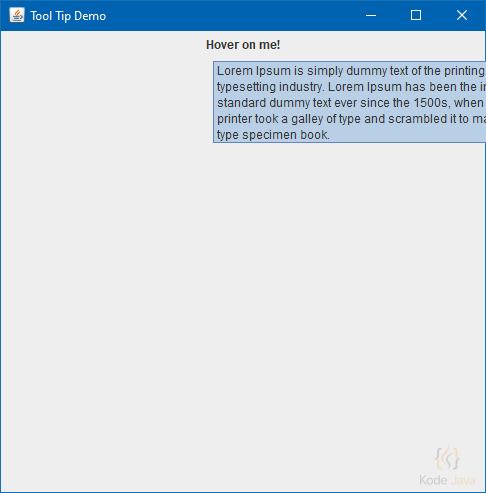
Multiline Tool Tips
Comments 0
Share your questions, experiences, or feedback about this article.
Sign in with Google to leave a comment.
Sign in with Google
No comments yet. Be the first to share your feedback.