
How do I remove JTree default icons?
You can remove JTree default icons by modifying the tree cell renderer object. To get the cell renderer call the JTree.getCellRenderer() which will return a DefaultTreeCellRenderer object. Then you can remove the icon by setting a null value to the setLeafIcon(), setClosedIcon() and setOpenIcon(). package org.kodejava.swing; import javax.swing.*; import javax.swing.tree.DefaultMutableTreeNode; import javax.swing.tree.DefaultTreeCellRenderer; import java.awt.*; public […]
Article by Wayan · Source: Kode Java ↗
You can remove JTree default icons by modifying the tree cell renderer object. To get the cell renderer call the JTree.getCellRenderer() which will return a DefaultTreeCellRenderer object. Then you can remove the icon by setting a null value to the setLeafIcon(), setClosedIcon() and setOpenIcon().
package org.kodejava.swing;

import javax.swing.*;
import javax.swing.tree.DefaultMutableTreeNode;
import javax.swing.tree.DefaultTreeCellRenderer;
import java.awt.*;

public class JTreeRemoveIcon extends JFrame {
    public JTreeRemoveIcon() throws HeadlessException {
        initializeUI();
    }

    public static void main(String[] args) {
        SwingUtilities.invokeLater(() -> new JTreeRemoveIcon().setVisible(true));
    }

    private void initializeUI() {
        setSize(500, 500);
        setDefaultCloseOperation(WindowConstants.EXIT_ON_CLOSE);

        DefaultMutableTreeNode root = new DefaultMutableTreeNode("Address Book");
        DefaultMutableTreeNode a = new DefaultMutableTreeNode("A");
        DefaultMutableTreeNode b = new DefaultMutableTreeNode("B");
        DefaultMutableTreeNode c = new DefaultMutableTreeNode("C");

        DefaultMutableTreeNode aContact = new DefaultMutableTreeNode("Alice");
        DefaultMutableTreeNode bContact = new DefaultMutableTreeNode("Bob");
        DefaultMutableTreeNode cContact = new DefaultMutableTreeNode("Carol");

        root.add(a);
        root.add(b);
        root.add(c);

        a.add(aContact);
        b.add(bContact);
        c.add(cContact);

        JTree tree = new JTree(root);

        // Remove default JTree icons
        DefaultTreeCellRenderer renderer = (DefaultTreeCellRenderer) tree.getCellRenderer();
        renderer.setLeafIcon(null);
        renderer.setClosedIcon(null);
        renderer.setOpenIcon(null);

        JScrollPane pane = new JScrollPane(tree);
        pane.setPreferredSize(new Dimension(200, 400));

        getContentPane().add(tree);
    }
}
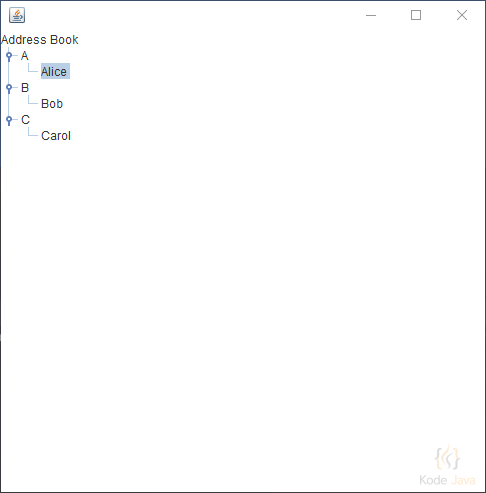
Remove JTree Default Icon
Comments 0
Share your questions, experiences, or feedback about this article.
Sign in with Google to leave a comment.
Sign in with Google
No comments yet. Be the first to share your feedback.