
How do I set the colors of JTabbedPane tabs?
The example below demonstrates how to change the color of the tabs in JTabbedPane component. The JTabbedPane‘s methods that you can use the change foreground and background color are: setForeground(Color color) for changing the foreground color of all tabs. setBackground(Color color) for changing the background color of all tabs. setForegroundAt(int index, Color color) for changing […]
Article by Wayan · Source: Kode Java ↗
The example below demonstrates how to change the color of the tabs in JTabbedPane component. The JTabbedPane‘s methods that you can use the change foreground and background color are:
setForeground(Color color)for changing the foreground color of all tabs.setBackground(Color color)for changing the background color of all tabs.setForegroundAt(int index, Color color)for changing foreground color for a tab at defined index.setBackgroundAt(int index, Color color)for changing the background color of a tab at a defined index.
package org.kodejava.swing;

import javax.swing.*;
import java.awt.*;

public class TabbedPaneTabColor extends JPanel {
    public TabbedPaneTabColor() {
        initializeUI();
    }

    public static void showFrame() {
        JPanel panel = new TabbedPaneTabColor();
        panel.setOpaque(true);

        JFrame frame = new JFrame("JTabbedPane Demo");
        frame.setDefaultCloseOperation(WindowConstants.EXIT_ON_CLOSE);
        frame.setContentPane(panel);
        frame.pack();
        frame.setVisible(true);
    }

    public static void main(String[] args) {
        SwingUtilities.invokeLater(TabbedPaneTabColor::showFrame);
    }

    private void initializeUI() {
        this.setLayout(new BorderLayout());
        this.setPreferredSize(new Dimension(500, 200));

        JTabbedPane pane = new JTabbedPane();
        pane.addTab("A Tab", new JPanel());
        pane.addTab("B Tab", new JPanel());
        pane.addTab("C Tab", new JPanel());
        pane.addTab("D Tab", new JPanel());

        // Set all tabs foreground color to black.
        pane.setForeground(Color.BLACK);

        // Set different background color for all tabs in
        // JTabbedPane. The color from the first to the last
        // tab will be red, green yellow and orange.
        pane.setBackgroundAt(0, Color.RED);
        pane.setBackgroundAt(1, Color.GREEN);
        pane.setBackgroundAt(2, Color.YELLOW);
        pane.setBackgroundAt(3, Color.ORANGE);

        this.add(pane, BorderLayout.CENTER);
    }
}
The image below shows the result of the code snippet above:
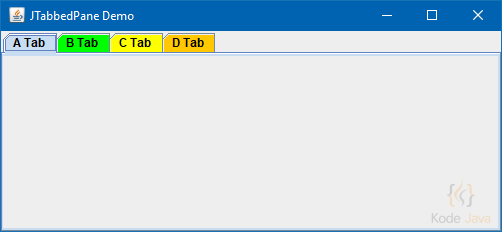
JTabbedPane Tabs Color Demo
Comments 0
Share your questions, experiences, or feedback about this article.
Sign in with Google to leave a comment.
Sign in with Google
No comments yet. Be the first to share your feedback.